Smart Order Lifecycle Tracking
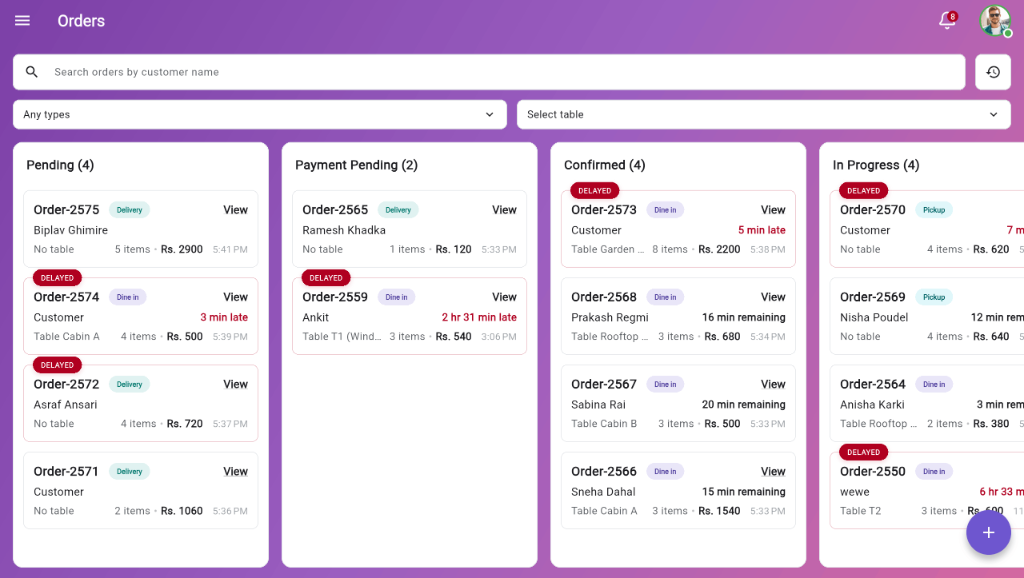
Track dine-in, takeaway, and delivery orders in real time from any device. Every order stays visible from placement to completion, reducing confusion and missed items.


Categorize your incoming orders with Kinyo.
With Kinyo, you can choose whether an order is a takeaway, dine-in, or a delivery order. This categorization helps you and your staff serve the customers accordingly.
- The taken order syncs across all your devices
- Each has related tags to identify them visually
Active Preview
Table 4 - Dine-In
2x Momo, 1x Chiya
Order #1042 - Delivery
1x Chicken Burger, 1x Fries
Order #1041 - Takeaway
1x Paneer Tikka
Follow orders through clear preparation stages
Orders go through clear steps and you can know exactly when food is placed, in kitchen, ready, or completed.
- Clear order stage progression (Confirmed, In progress, Ready, and Completed).
Active Preview
Order Placed
Kitchen receives KOT ticket instantly
Preparing in Kitchen
Status set to Preparing. Timer starts
Food Ready / Served
Front staff notified, order served & paid
Manual Order Confirmation
For online orders, you can confirm if you want to accept or reject the order. When you accept it, you can either notify for payment or confirm the order directly.
- You can manually confirm orders to avoid order spam.
- Notify for payment or confirm the order directly.
- Directly confirm the order for your regular customer.
Active Preview
Order Placed
Kitchen receives KOT ticket instantly
Preparing in Kitchen
Status set to Preparing. Timer starts
Food Ready / Served
Front staff notified, order served & paid